
The real estate CRM software market was valued at USD 4.73 billion in 2025 and is projected to reach USD 14.97 billion by 2035, growing at a CAGR of 12.2%, driven almost entirely by integration demand. Yet most PropTech development teams still treat CRM connectivity as an afterthought, bolting on property data feeds after core features ship. The result: duplicate records, stale valuations, and a support queue full of sync errors that erode agent trust.
Integrating real estate APIs with CRM systems isn’t a one-sprint task. It’s a pipeline architecture decision with direct revenue consequences. When property condition data, valuation scores, and investment metrics flow automatically into deal and contact records, agents close faster, lenders underwrite with confidence, and investors act on real-time intelligence instead of yesterday’s spreadsheet.
This guide walks IT developers through the integration patterns, field-mapping strategies, and ROI measurement frameworks that turn a basic API connection into a measurable business asset. Platforms like Homesage.ai provide RESTful property intelligence APIs designed for CRM integration but the architectural choices you make determine whether that data actually moves the needle.

Why Real Estate CRM Integration Is Now a Core Developer Priority
78% of real estate firms now leverage cloud-based CRM solutions for centralized data management and workflow automation. The shift to SaaS CRMs, Salesforce, HubSpot, Follow Up Boss, Pipedrive, means REST APIs, OAuth 2.0, and webhook support are table stakes on both sides of the pipeline. Property data APIs and CRM platforms now speak the same protocol. See the developer’s guide to real estate data.
The technical barrier isn’t connectivity. It’s data architecture. How do property data objects map to CRM contact, deal, and company records and how do you keep that mapping consistent across sync cycles without burning API credits or introducing stale data? For a broader view of the protocol-level tradeoffs worth understanding before you design your integration layer, the MCP vs APIs guide is a solid starting point.
Three integration challenges appear consistently across real estate CRM builds:
- Data freshness: Property valuations and market conditions change daily. CRM records go stale fast without a deliberate refresh strategy.
- Field schema mismatches: Real estate APIs return nested JSON objects; most CRMs expect flat key-value pairs. Transformation logic is unavoidable.
- Rate limit management: High-volume CRM workflows exhaust API quotas quickly without request batching or caching layers.
Solving all three from the start, before you write the first webhook handler, separates integrations that scale from integrations that break.
4 Integration Patterns for Real Estate APIs and CRM Systems
Choosing the right architecture depends on your data volume, latency requirements, and CRM platform. Here are the four patterns developers use most in production PropTech environments.
1. Direct REST Integration
Your CRM backend calls the real estate API endpoint on demand, triggered by a lead creation event or an agent clicking “Enrich Property.” Simple to implement, easy to debug, and appropriate for low-volume use cases under 500 daily enrichment requests.
Best for: MVP builds, small brokerages, or CRMs without native webhook support.
2. Webhook-Driven Event Architecture
Instead of polling on a schedule, your integration subscribes to property update events. When a valuation, condition grade, or seller flexibility score changes, the API pushes the update directly to your CRM. Event-driven webhook architectures reduce 70–80% compared to traditional polling patterns in real estate data integrations. For platforms processing hundreds of property updates daily, this difference is meaningful at scale.
Best for: Investor CRMs tracking large portfolios, lender pipelines where data freshness is critical.
3. Middleware / iPaaS Layer
Tools like Zapier or Make sit between the real estate API and the CRM, handling field mapping and trigger logic without custom code. Useful when non-developers need to manage mapping rules or when the target CRM doesn’t expose a full REST API.
Best for: Mixed-skill teams, enterprise CRMs with limited direct API access.
4. Batch Data Sync
A scheduled job pulls property data for a defined address set in bulk, transforms the response, and writes to the CRM database. Less real-time than webhooks but significantly more cost-efficient at high volume.
Best for: Portfolio management tools, lender platforms with nightly bulk underwriting cycles.
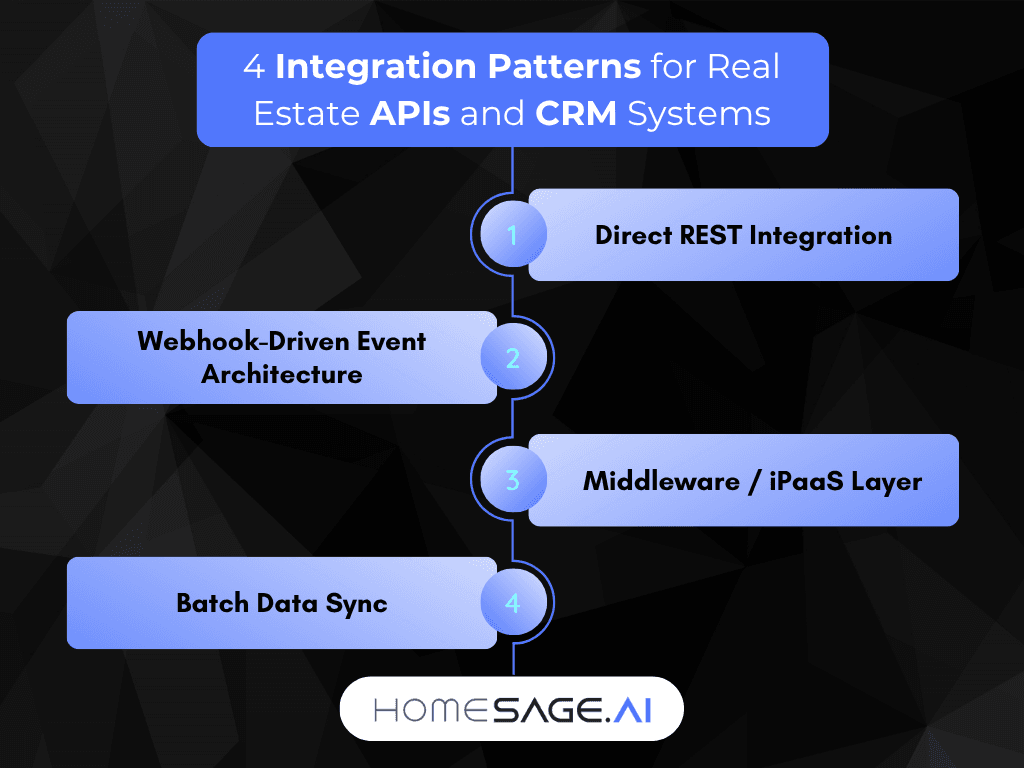
For most investor and lender CRM builds, a webhook-first architecture with batch fallback hits the best balance of data freshness, credit efficiency, and operational simplicity. The real estate API integration strategies post covers how these patterns connect to AI enrichment layers in detail.
| Integration Pattern | Latency | Dev Complexity | Best Volume | Real-Time Updates | Cost Efficiency |
|---|---|---|---|---|---|
| Direct REST | Medium | Low | < 500/day | No | Moderate |
| Webhook-Driven | Low | Medium | 500–50K/day | Yes | High |
| Middleware / iPaaS | Medium | Low–Medium | < 5K/day | Partial | Low–Medium |
| Batch Data Sync | High | Medium | 10K+/day | No | Highest |
Field Mapping: From Property API Response to CRM Objects
This is where most integrations fail. A real estate API returns a deeply nested JSON object: property attributes, valuation scores, rental projections, condition grades, and your CRM expects flat contact or deal fields. Use this four-step framework to get it right the first time.
Step 1: Anchor on the normalized property address. Use USPS-standard format (Street Number + Name + Suffix + City + State + ZIP) as the primary join key between your API response and CRM record. Inconsistent address formats are the single most common source of duplicate CRM records in property data pipelines.
Step 2: Create custom CRM fields before writing any sync logic. Map each API data point you’ll use to a dedicated custom property in your CRM. Keep naming conventions consistent with the API response keys to reduce transformation overhead.
Step 3: Write a reusable JSON flattening function. Build a single transform utility that takes nested API JSON and outputs flat key-value pairs your CRM can consume. Test it against edge cases: properties without renovation history, addresses with unit numbers, vacant land records. This function runs thousands of times in production; invest in it early.
Step 4: Store field mappings in a versioned config file. Never hardcode mappings in integration logic. When the API schema updates, you change one config file instead of hunting through multiple functions. The real estate API documentation guide for developers covers response schemas and endpoint specifications that inform this mapping work.
Measuring ROI on Your Real Estate CRM Integration
Building the integration is step one. Proving its value to stakeholders is step two. Track these four metrics from day one.
Time saved per enrichment cycle. Measure how long agents or underwriters spent pulling property data manually before the integration. Ten minutes saved per record at 200 records per week compounds to over 300 hours annually per team.
Data freshness rate. What percentage of CRM property records update within 24 hours of a market change? Target 95%+ for investor and lender platforms where stale data directly affects deal decisions.
CRM adoption rate post-integration. Well-integrated property data increases CRM usage. When the system surfaces investment scores, rental projections, and condition grades automatically, agents actually log in. Track weekly active users before and after go-live.
API credit consumption vs. business outcome. For APIs with credit-based pricing, including Homesage.ai‘s plans covering 155M+ US properties (Small: 1,250 credits/mo, Medium: 5,000/mo, Large: 20,000/mo), map credit spend to specific CRM workflows and closed-deal rates. The API pricing and credit plans page lets you model cost per enrichment call before committing to a pattern. The Full Property Report API endpoint is particularly relevant for investor and lender CRM workflows that require deep property intelligence per record.

Common Integration Pitfalls and How to Avoid Them
Polling instead of webhooks by default. Most developers reach for polling because it’s familiar. For property data that updates daily or intraday, polling burns API credits and returns stale data between cycles. Default to webhooks wherever the API supports them. The best practices for real estate API implementation guide covers this in detail.
No deduplication logic. Real estate APIs return the same address in multiple formats. Without normalization, your CRM accumulates duplicate records for the same property: one from the listing feed, one from the enrichment call, and one from the comps request.
Treating the CRM as a data warehouse. CRMs are optimized for relationship and pipeline management, not property data storage at scale. Store raw API responses in a dedicated database; sync only the derived fields your users actually act on.
Skipping rate limit headers. Every production-grade real estate API returns rate limit headers with each response. Build exponential backoff with jitter into your retry logic from day one, not after your first 429 error. Developers building app-layer integrations will find the top real estate APIs for app development roundup useful for evaluating rate limit behavior and SDK support across major providers.
Key Takeaways
- Choose your integration pattern before writing code. Webhook-driven architecture outperforms polling in nearly every production real estate CRM integration. Batch sync is more cost-efficient for nightly bulk workflows. Match the pattern to your actual latency requirement and volume.
- Field mapping is the hardest part. Most CRM integration failures happen at the data transformation layer, not the API connection layer. A versioned, reusable field-mapping config built in sprint one saves weeks of debugging later.
- ROI is measurable from day one. Track time saved per enrichment, data freshness rate, CRM adoption, and API credit efficiency from go-live. These are the numbers stakeholders understand.
- Homesage.ai is an AI-powered real estate data platform that covers 155M+ US properties, delivering property intelligence via REST/JSON APIs with sub-100ms response times, 99.9% uptime, and event-driven webhooks purpose-built for CRM integration.
Explore the Homesage.ai real estate APIs, including an interactive API playground and credit-based pricing that scales from MVP to enterprise. - Error handling and deduplication are not optional. Build normalization, retry logic, and rate limit handling into sprint one, not sprint three.
See these integration patterns in action. In the video below, the Homesage.ai team walks through how IT developers use real estate APIs to drive measurable sales results.
For the wider picture, see our guide to real estate app development.
Conclusion
Real estate CRM integration is a data pipeline that compounds value as your platform grows. The teams that build it right with a clear integration pattern, versioned field mappings, and measurable ROI tracking end up with a CRM that agents, lenders, and investors actually rely on.
The real estate CRM market is growing at 12.2% annually because the industry finally has API infrastructure worth integrating. Developers who move property intelligence reliably into CRM workflows will build the platforms that lead that market. Explore the APIs realtors can use to increase sales.
If you’re ready to start building, the Homesage.ai IT developers page covers API authentication, endpoint documentation, an interactive playground, and credit-based pricing designed to scale from MVP to enterprise. The top real estate APIs in 2026 comparison is also worth reviewing before finalizing your data provider selection.
People Also Ask
Q: What is the best integration pattern for connecting a real estate API to a CRM in 2026?
A: For most production environments, a webhook-driven event architecture is the most effective approach. It delivers property data to your CRM in near real-time, reduces server polling load by up to 80%, and scales efficiently as deal volume increases. Pair it with batch sync for nightly bulk workflows where real-time latency isn’t a requirement.
Q: What real estate CRM integration tools do developers use most in 2026?
A: The most common real estate CRM integration tools in 2026 include direct REST API connectors, iPaaS platforms like Zapier and Make for low-code middleware, and custom webhook handlers for event-driven architectures. For property data, APIs like Homesage.ai offer RESTful endpoints, JSON responses, and native webhook support designed specifically for CRM integration at scale.
Q: How do I map real estate API fields to CRM objects?
A: Anchor on the normalized property address as your join key, create custom CRM fields for each data point you’ll sync, write a reusable JSON flattening function for nested API responses, and store all field mapping logic in a versioned config file separate from your integration code. This approach keeps API schema updates manageable without breaking production pipelines.
Q: How do I calculate ROI on a real estate CRM API integration?
A: Track four metrics from day one: time saved per property enrichment cycle, data freshness rate (target 95%+ updated within 24 hours), CRM weekly active users before and after go-live, and API credit consumption mapped to closed deals. These give stakeholders a business-language ROI case without requiring them to read an architecture diagram.





Mike March 31, 2026
Helpful!
James March 31, 2026
Super practical insights here
Nourhan May 2, 2026
Very helpful!
N May 3, 2026
Very helpful!
Emma May 3, 2026
Great read