
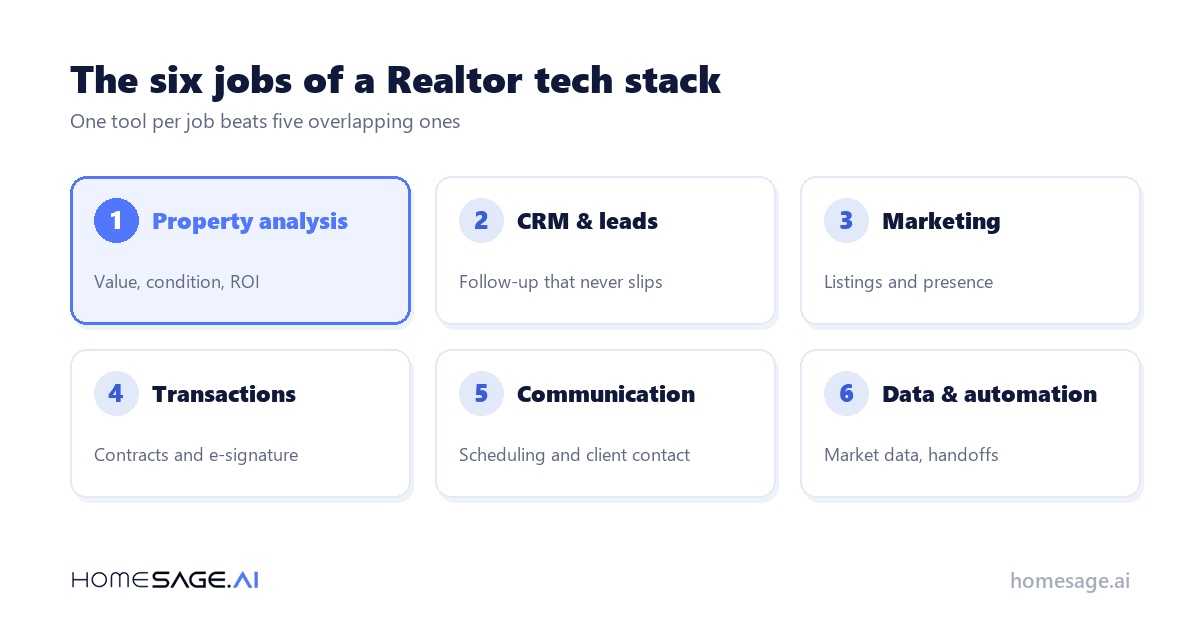
“Quick answer“The best real estate tools for Realtors in 2026 fall into six jobs: analyze the property, manage the pipeline, market the listing, close the transaction, communicate with clients, and automate the rest. Most Realtors need one tool per job, not twenty. This guide ranks 20 options by what each is genuinely best at, and it flags which ones are free.”
Introduction
iBuyers Promised to Replace Realtors That hasn’t happened, but the pressure is real. Instant cash offers, algorithm-driven pricing, and frictionless closings have permanently raised what buyers and sellers expect from the person representing them.
The bar is no longer “knows the neighborhood.” It’s “answers my question before I’ve left the kitchen table.”
Realtors have noticed. In the National Association of Realtors’ 2025 Technology Survey, 32% of Realtors said they had not yet used AI in their business, which puts adoption at roughly 68% — a technology that barely registered three years ago. Tooling has stopped being a differentiator and started being table stakes.
The Realtors winning in 2026 aren’t working harder. They’re working smarter by running a stack: a handful of tools that answer a seller’s pricing question in minutes, keep every lead warm automatically, and make a listing look institutional-grade without an institutional budget.
Below are 10 tools worth knowing, grouped by the job they do. Start with the comparison table, then read only the section that matches the gap in your business. If you already have a CRM you actually maintain, skip that section entirely.
The 10 Tools at a Glance
Every tool below, what it’s for, and how it charges. Pricing is described by model rather than by figure, because vendor pricing moves faster than blog posts do.
- Homesage.ai – Category: AI property analysis. Best for: Instant valuations, comps, renovation costs, seller negotiability. Pricing model: Subscription + credits.
- RPR – Category: Market data. Best for: Free property and market reports for NAR members. Pricing model: Free with membership.
- Follow Up Boss – Category: CRM. Best for: Teams that live in their lead pipeline. Pricing model: Per-user subscription.
- HubSpot CRM – Category: CRM. Best for: Solo Realtors starting free. Pricing model: Freemium.
- Canva – Category: Design. Best for: Listing graphics, flyers, social posts. Pricing model: Freemium.
- Dotloop – Category: Transactions. Best for: End-to-end transaction workflows. Pricing model: Subscription.
- DocuSign – Category: E-signature. Best for: Fast, legally binding signatures. Pricing model: Subscription.
- Calendly – Category: Scheduling. Best for: Removing back-and-forth on showings. Pricing model: Freemium.
- Zapier – Category: Automation. Best for: Connecting tools without code. Pricing model: Freemium.
- jasper.ai – Category: Content. Best for: Listing descriptions and follow-up drafts. Pricing model: Freemium.
AI Property Analysis and Valuation Tools
This is the category that changed most since 2024. Pricing a home used to mean an afternoon pulling comps and a night formatting them; it now takes minutes, and clients increasingly expect the answer in the first meeting rather than the follow-up email.
The two tools below approach the same problem differently: one analyzes the property, and one comes bundled with the dues you already pay. If you want to compare the wider category, our roundup of AI-powered CMA tools goes deeper.
1. Homesage.ai
Homesage.ai turns any US address into an investor-grade analysis: current value, comparable sales, property condition read from property photos, renovation cost estimates, and projected returns. It provides insights on 155M+ US properties, so coverage extends well past the markets where a Realtor has personal history.
For Realtors, what stands out is the Seller Motivation Score — an estimate of how likely a seller is to accept below the asking price. That is the question every buyer asks and almost no tool answers, and having a defensible number beats having an instinct.
The Full Property Report packages the whole analysis into something you can walk a client through, and the DealFinder Browser Extension runs the same read on any listing page without leaving the tab you’re already in.
Best for: Realtors who field pricing and negotiability questions live. Worth knowing: there are also real estate APIs and MCP if your brokerage wants the data inside its own systems, though no Realtor needs to touch those to use the product.
2. RPR (Realtors Property Resource)
RPR is included free with NAR membership and remains the best-value property and market data source for Realtors who already pay dues. Coverage is broad, the market reports are client-ready, and the price is zero on top of what you’re already spending.
The common mistake is forgetting it exists — plenty of Realtors pay for a second data subscription that duplicates most of what RPR already gives them.
Best for: any NAR member who hasn’t logged in this year. Check it before you buy anything else in this category.
CRM and Lead Management Tools
The most common reason Realtors lose deals isn’t skill — it’s follow-up. NAR ranks CRM as the second most effective lead-generating technology at 23%, behind only social media at 39%. A CRM is the least glamorous purchase on this list and usually the highest return, and it’s the one tool where the cheap option you actually maintain beats the expensive one you abandon in March.
1. Follow Up Boss
Built specifically for real estate teams, with lead routing, calling, and automated follow-up sequences. It’s the default choice for Realtors whose day is driven by their pipeline rather than their calendar, and the sequences do the remembering so you don’t have to.
The trade-off is that it assumes volume; a solo Realtor closing a handful of deals a year will feel over-equipped.
Best for: teams and high-volume solo Realtors.
2. HubSpot CRM
A capable free tier makes it a sensible starting point for solo Realtors who want structure without a monthly commitment. It isn’t real-estate-specific, which is both its weakness and its flexibility: you won’t get listing-aware fields out of the box, but you also won’t outgrow it.
For a Realtor whose current CRM is a spreadsheet and a good memory, this is the lowest-friction upgrade available.
Best for: solo Realtors moving off spreadsheets.
Marketing and Listing Presentation Tools
Listings compete on the first three photos and the first six seconds of video. These tools close the gap between a phone camera and a professional shoot. NAR found 46% of Realtors now use AI-generated content, most often for listing descriptions — which means competent marketing is no longer a differentiator on its own, and the visual layer is where the remaining advantage sits.
1. Canva
Templates for flyers, social posts, market updates, and listing graphics. The free tier covers most of what a Realtor needs, and the brand kit feature keeps your materials consistent once you’ve set your colors and fonts once. The realistic risk is time, not money: it’s easy to spend an hour perfecting a graphic that a client looks at for two seconds.
Best for: everyone. Set up a brand kit on day one.
Transaction and Document Management Tools
Once a deal is live, speed and compliance matter more than creativity. This is also the most settled category on the list: eSignature is the single most-used technology in the profession at 79% adoption, which means clients already know how it works and will notice if you make them print something.
1. Dotloop
Manages the transaction from offer to close in one place, with e-signature built in. The value is having one place where the current version of every document life, which removes the most common source of closing-week confusion. Adoption tends to follow the brokerage rather than the Realtor.
Best for: Realtors who want the whole transaction in one workspace.
2. DocuSign
The e-signature standard clients already recognize, which reduces friction at exactly the wrong moment to have any. Recognition is the whole feature: a client who has signed a mortgage document in Docusign before will not stall on yours.
Best for: anyone who does not already have e-signature bundled elsewhere.
Communication and Client Experience Tools
This category gets skipped because it isn’t exciting, and then it quietly costs deals. Most of the friction a client feels in a transaction is scheduling friction and the sense that reaching you is hard work. Two tools fix most of it.
1. Calendly
Removes the back-and-forth of scheduling showings and consultations by letting clients book into your real availability. Six messages become one link. Set buffers and a daily cap unless you want your Saturday booked solid by strangers.
Best for: Realtors losing hours a week to scheduling messages.
Market Data and Automation Tools
The last two are not daily-use tools for most Realtors, but they are what separates an operator from a practitioner. One connects everything else together, and one drafts the words.
If you’re weighing bulk data against an analysis layer, we’ve written a direct comparison of when to use each.
1. Zapier
Connect the tools above to each other without code — for example, adding every new portal to your CRM and triggering a first follow-up automatically.
The rule of thumb: automate a handoff only after you’ve done it manually enough times to know it is stable. Automating a broken process just breaks it faster.
Best for: Realtors with three or more tools that do not talk to each other.
2. Jasper.ai
Useful for first drafts of listing descriptions, follow-up emails, and social captions. Treat the output as a draft: accuracy and fair-housing compliance remain yours, and a generated description that mentions a “family neighborhood” or a “safe area” is a compliance problem with your name on it. Read every word before it goes out.
Best for: Realtors who write slowly and edit well.
How Tech-Enabled Realtors Compete With iBuyers
This is where the stack pays off. An iBuyer wins on speed and certainty; a Realtor wins on price outcome and judgment — but only if the speed gap is closed. A seller choosing an instant offer is usually not choosing against you on price. They’re choosing against waiting.
- Time to a pricing answer – Traditional Realtor: Days. Realtor with a tech stack: Minutes. iBuyer: Instant.
- Negotiation insight – Traditional Realtor: Experience and instinct. Realtor with a tech stack: Data-backed seller negotiability. iBuyer: Not applicable — they are the buyer.
- Net price outcome for the seller – Traditional Realtor: Market price. Realtor with a tech stack: Market price. iBuyer: Typically, below market, in exchange for certainty.
- Certainty of closing – Traditional Realtor: Depends on the buyer. Realtor with a tech stack: Depends on the buyer. iBuyer: High.
- Cost to the seller – Traditional Realtor: Commission. Realtor with a tech stack: Commission plus tooling. iBuyer: Service fee, often comparable or higher.
- Where it wins – Traditional Realtor: Complex or high-touch sales. Realtor with a tech stack: Speed plus judgment. iBuyer: Sellers who value speed over price.
The practical version: when a seller asks what their home is worth, an answer in the room beats an answer next week. When a buyer asks whether the seller will negotiate, a data-backed answer beats a guess.
Tools like Homesage.ai exist to close that specific gap, and our guide to running comps with AI walks through what a defensible fast answer looks like.
The competitive argument against iBuyers is not that Realtors care more. It is that a Realtor with the right stack is now as fast and still gets a better price.
How to Choose Your Stack
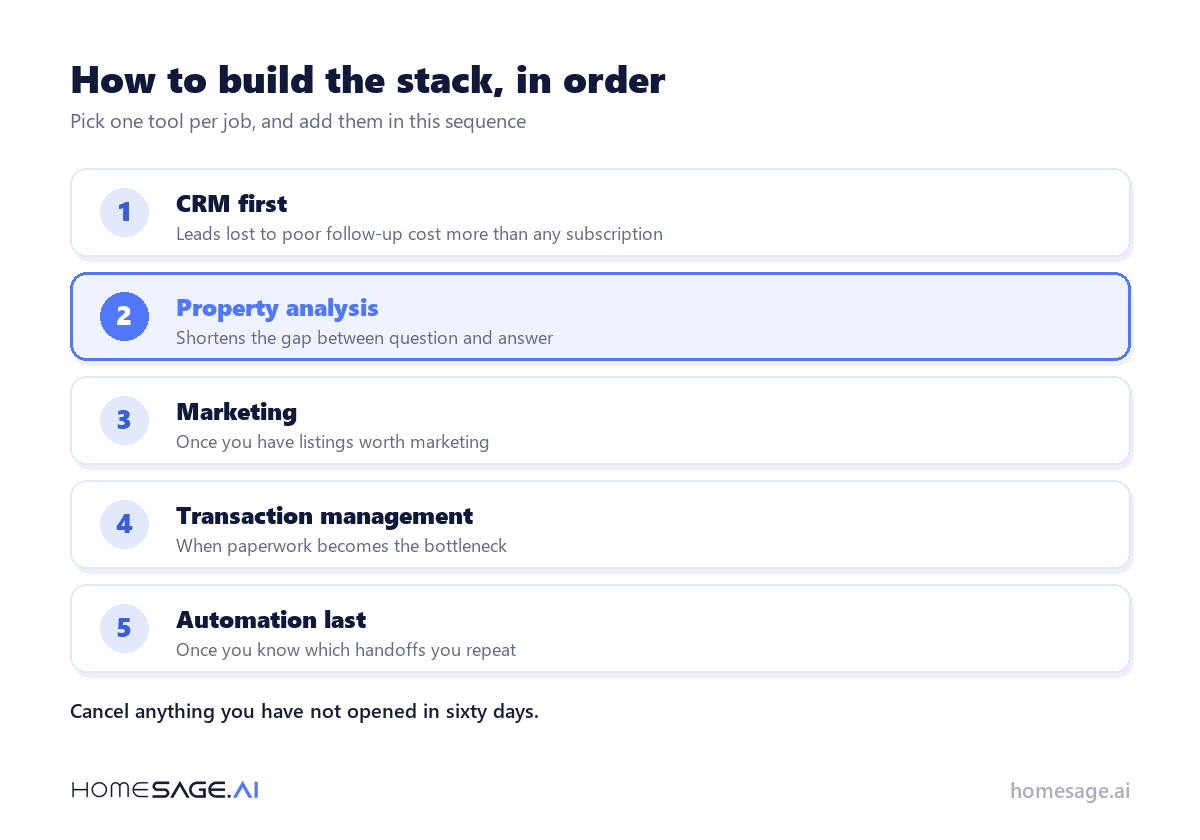
Do not buy ten tools. Pick one per job, in this order:
- Start with the CRM. Leads lost to poor follow-up cost more than any subscription, and NAR’s own numbers put CRM second only to social media as a lead source.
- Add property analysis next. It shortens the gap between question and answer, which is precisely where iBuyers beat Realtors.
- Then marketing, once you have listings worth marketing. Marketing an empty pipeline is an expensive hobby.
- Add transaction management when volume makes paperwork the bottleneck, not before.
- Automate last, once you know which handoffs you actually repeat.
Two rules keep the stack honest. Cancel anything you haven’t opened in sixty days — dormant subscriptions are the most common line item in an over-tooled Realtor’s expenses. And before buying anything, check whether your brokerage or your NAR membership already provides it, because a surprising amount of this list is already paid for.
Key Takeaways
- The 2026 Realtor stack covers six jobs: analyze, manage, market, close, communicate, and automate.
- The largest competitive gap versus iBuyers is answer speed, which is a tooling problem rather than a talent problem.
- Most Realtors are over-tooled and under-integrated. One tool per job beats five overlapping ones.
- Free tiers — RPR, HubSpot, Canva, Calendly — cover a surprising amount of a solo Realtor’s needs.
- Roughly 68% of Realtors now use AI in some form, so AI-assisted work is a baseline expectation rather than an edge.
Conclusion
Technology hasn’t replaced the Realtor — it has raised the floor. The tools above are how the floor gets met: faster answers, tighter follow-up, better-presented listings, and fewer things falling through the cracks.
None of them close a deal on their own, and a Realtor with poor judgment and twenty subscriptions is still a Realtor with poor judgment.
If you only add one thing this quarter, make it the tool that answers your clients’ pricing questions on the spot. You can check any address in a Homesage.ai Full Property Report — including how negotiable the seller is likely to be — or see how the platform fits a Realtor’s day on our tools for realtors page.
The short video below shows the kind of instant property analysis this category is built around.
Video: AI-powered investment analytics in one click
Frequently Asked Questions
Q: What Tools Do Realtors Need?
A: At minimum: a CRM for follow-up, a property analysis tool for pricing questions, a design tool for listing marketing, and e-signature for closing. Everything else is optimization. A Realtor with those four, used consistently, will out-perform a Realtor with fifteen tools used occasionally.
Q: What Is the Most Important Tech Tool for Realtors in 2026?
A: The CRM, because lost follow-up is the most expensive recurring failure in the business — NAR ranks it as the second most effective lead-generating technology at 23%. Property analysis is a close second, because that is where client expectations have shifted most.
Q: Do These Tools Require Coding?
A: No. Every tool listed works without code. APIs and MCP exist for brokerages that want data inside their own systems, but no individual Realtor needs to touch them.
Q: Can Solo Realtors Compete With iBuyers Using Technology?
A: Yes. The gap iBuyers exploit is speed of answer, and that gap closes with tooling rather than headcount. A solo Realtor who can price a home in the room is competing on the same axis an iBuyer competes on, while still delivering a better net price.
Q: How Much Should a Realtor Spend on Tools?
A: Most Realtors can cover the essentials by combining free tiers with one or two paid subscriptions. For context, NAR found that 34% of Realtors spend $50 to $250 a month on technology, 20% spend $251 to $500, and 24% spend more than $500. Spend where the bottleneck is, not where the marketing is loudest.
Q: How Do I Know if an AI Real Estate Tool Is Accurate?
A: Check whether it shows its work — comparable sales, data sources, and a stated methodology. A number without a rationale isn’t an analysis, it’s a guess with a confident font. Ask what the tool does when data is thin, because that’s where weak products quietly fail.
- NAR 2025 Realtors Technology Survey — National Association of Realtors
- Realtors Embrace AI, Digital Tools to Enhance Client Service — NAR press release, 18 September 2025





N March 5, 2026
Great Read!
Emma March 5, 2026
Insightful!
Val March 8, 2026
Interesting perspective